b2evolution version 2.4.1 "Nevada" has been released. This is the first 2.x release we consider to be rock stable!
This version basically builds upon the already stable 2.4.0 with weeks of merciless bug fixing. There is no major fix but a lot of little things that have been ironed out.
Also, upgrading from 2.4.0 is merely a 5 minute file upload operation. There are no database changes. It is not necessary to run the install/upgrade script. And needless to say, it is not necessary to update your skins.
Upgrade is highly recommended for all users. As of May 1st, the 1.10 branch will no longer be maintained.
Major changes:
powered_by( array() ) skin tag (can be used to replace the long html blurb that was used before).Next version should be 2.5-beta which will introduce new features and hence be less stable.
b2evolution 2.0 comes with a brand new backoffice design a.k.a admin skin, named "Chicago":
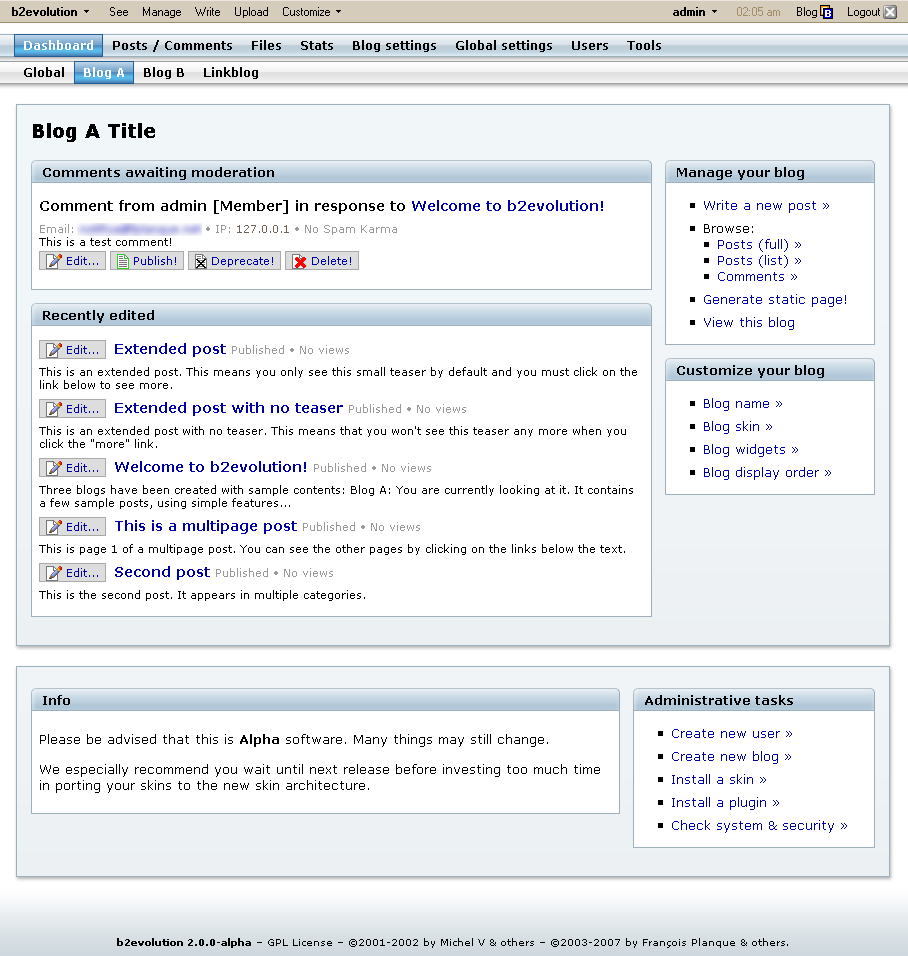
Though not completely polished yet, we hope it reflects how much effort we're putting into the new b2evolution 2.0.
Of course, if you're nostalgic (or if your IE chokes on CSS), you can still use the legacy or the evo admin skins.
By the way, you can now switch admin skins easily from the "evobar" at the top of the screen. In case you wonder: yes that bar is also displayed on top of the public blog page... if you're logged in!
Other than that, you can see on the screenshot that the backoffice now comes with a "dashboard" which gives you fast and easy access to the items you need the most like the comments awaiting moderation (with one click buttons) as well as your recent draft posts (am I the only one repeatedly forgetting to publish my drafts?
)
b2evolution 2.0.0-alpha will be out in a few days now.
b2evo 2.0 is coming with enhanced configuration options, among which:
We hope to have something out this month. ![]()
b2evolution first introduced blog skins in 2003. Of course, since then, every other blog platform has implemented its own flavor of skins or themes and the concept has become pretty mainstream.
With version 2.0 we hope to take the concept one step further with the introduction of a new reworked modular skin architecture.
One of our design goals with this new skin architecture was to address the main requests we got about skins:
Regarding the upgrading, we had already slowed down on incompatibilities with versions 1.8 to 1.10: skins designed for b2evo 1.8 work without modification in 1.9 and 1.10.
However, with version 2.0, we are refining *all* the skin tags in a way that will maximize their upward compatibility with future versions. Our goal here is that once you upgrade your customized skin to 2.x-stable, you will never have to upgrade it again if you don't want to...
Combing through all these tags to make them future proof is what currently takes the most time and holds back the release of 2.0...
Regarding easier customization, we have introduced containers and widgets.
Instead of calling a lot of plugins with various parameters, skins 2.0 now simply define containers such has "Header" or "Sidebar" (to name the obvious ones).
Then, in the back-office, a blogger can easily add widgets to the containers of his choice. He would for example add a "Logo widget" and a "Blog list widget" to the Header. Then he would maybe add a "Calendar widget", a "Category list widget" and an "XML feeds" widget to the sidebar. He can also change the order of these widgets at any time.
Widgets automatically get their display parameters from the skin containers. This allows them to automatically adopt the look & feel of the container they're used in. For example: lists may display vertically in the sidebar but horizontally in the header.
However, widgets can also define their own parameters and users can easily set these through a form. Would you like to be able to browse years in that calendar? What file do you want to display as the blog logo? etc...
b2evolution 2.0 will ship with more than a dozen core widgets, as well as plugin widgets ("Who's online?"...) Plugin authors already know how to write their own widgets: they are simply "SkinTag" plugins just as before. Except that now users have an interface to place them at the desired place.
Optionally, you can define parameters for the Widget/skinTag plugin. For example, a weather plugin would define the "city" parameter. It would use it to display the weather for the city of the blog it is included in. And it could even be included twice in the same blog, with different parameters. (Didn't you always dream to track the weather for your work town and your home town on your blog's sidebar?
)
Another improvement is that skins can now display something completely different when you are viewing a post list, a single post, a user contact form... or a page.
Yes, b2evolution 2.0 supports out-of-the-flow pages that you can use for general purpose information (what the blog is about, your résumé, rules for commenting...). And you can easily link to your pages from anywhere on your sidebar: just throw in the "Page list widget". Want to link to the pages from the header: just the same! ![]()
Of course, the grassroots evolution bloggers among us will still want to fine tune every little aspect of their skin. We can still do that just as before by editing the skin templates... and it may actually just have gotten easier...
You can now browse through your skin templates online with the embedded file manager and, should you need to, you can edit any template, and especially any CSS file right in place on the server.
Finally, we are adding quite a lot of comments into the skin templates in order to make sure you will feel comfortable with the new skinning system just by opening the files in Dreamweaver or whatever editor you like.
... actually, skins 2.0 simply follow the evolutionary path we've been on since spinning off b2: more features, cleaner code, better comments! 
Advanced user permissions have long been both one of b2evolution’s strengths and one of its weaknesses.
On one hand they allowed unmatched control over who could do what on which blog. That was good in those complex multiblog-multiuser setups. On the other hand, they could be pretty confusing for newcomers who were blogging just by themselves and didn’t need any complex permissions.
Yet, the admins of enterprise blog platforms wanted even more flexibility with their permissions…
With b2evolution 2.0 we have addressed this the following way:
First, advanced permissions are now turned off by default. That means that when you create a new blog, you assign it to an owner and that’s it. The simplest case being: you are the admin, you create a blog for yourself, you are the owner of the blog.
The blog owner can do almost anything on his blog without requiring any additional permission.
There are a few advanced things that the owner cannot do though. Among these: change the base URL of his blog, aggregate other blogs on his blog, set up a static file… These things require an advanced admin privilege. Again, on single user setups, the owner is also the system admin, so he can do whatever he wants, without trouble.
Now if a blog owner wants to invite additional users to blog on one of his blogs, he can turn on advanced permissions in his blog’s features panel. By doing so, the “User perms” and “Group perms” tabs appear in the blog settings.
Those advanced permissions tabs work mostly like before: any user can be declared as a member, a contributor, a publisher, a moderator or an admin of any specific blog.
The advanced permissions can also be given on a more granular level (e-g who exactly can upload a file, who can publish drafts, etc…). Those permissions can also be granted to user groups just like before.
There are a few new advanced permissions though, among which the post editing permission!
So far, when a contributor had permission to post, he could also edit existing posts. Any existing posts…
Well, no more! Now you can decide for each user and/or group what posts he can edit. He may be allowed to post but not to edit anything at all. Or he may be allowed to edit only his own posts. Or he could be allowed to edit only posts written by someone with a user level lower than his own. Or equal user level. Or all posts.
Needless to say, the admin group has a super-permission that superseedes all this and lets them edit anything, anywhere, anytime without any hassle.
We hope this will satisfy most of the advanced as well as the simplification requests we have received since the introduction of advanced perms two years ago. If not, let us know…
All this and more coming to a blog near you this summer — b2evolution 2.0.
Another frequent question about Phoenix is: What are these "workflow" fields for?
Workflow fields are: Status, Assigned to, Priority and Deadline.
These fields are particularly useful when you are publishing a professional blog which involves several editors before a post goes public. You would typically create new posts as Drafts and then Assign them to someone for review, with a given priority and/or deadline.
You can use none, all or only several fields at your convenience.
The Status field is there in case "draft" is not enough for you. You can add your own custom statuses under the Settings tab. You might want to create statuses such as "idea", "to be reviewed", "needs spell check", "needs final approval", etc.
You will also discover some brand new uses of b2evo with these fields in future releases (probably starting in 1.7)
Now, if you don't need this at all and you think it's just an annoyance on your screen, rest assured, we'll give you an option to turn this off completely very soon. Even better, we'l give you control over hald a dozen of features of the edit screen, allowing you to display just as much as you really need and keeping the other features under the hood, just in case you need them sometime later.
The latest "Dawn" release will apply a rel="nofollow" by default to all comment/trackback links posted on a blog. Since I get all sorts of questions about that all the time, here is a quick explanation...
The purpose of rel="nofollow" is to tell Google (and most other major seach engines) this "I don't know who posted this link, I cannot guarantee it is relevant, I am not endorsing this link". The result is that this link will have no contribution in raising the refered site's pagerank and placement in the list of results.
The indirect purpose of having that by default in b2evolution is to tell spammers this: "Do not bother searching for b2evolution powered sites on Google in order to post spam in them, because spam on those sites will provide *no* contribution in raising your site's pagerank...".
Before "Dawn" it was exactly the opposite. b2evo was like a honeypot for comment spammers.
In a similar manner, "Dawn" won't display any referers publicly any longer. This again is to tell spammers this "Do not bother referer spamming b2evolution blogs, because your referers won't even appear anywhere to be seen".
Now, the question many people raise is this: "When someone posts a legitimate comment, I want to endorse the link to his site and I want Google to give that site a little love on my behalf...". Right. We understand that. The plan is to have a checkbox in the backoffice to remove rel="nofollow" from comments you have approved, but *only* those that you have approved. Again we don't want spammers to get through it. Also, when a comment is suspect, sth like "Nice site." and an URL to a page that is "Under Construction" (i-e waiting to be used...) we encourage everyone *not to* endorse the URL, even if you might want to keep the comment...
Next question is "when?". The Answer is "Phoenix", a few weeks, something like that... unless someone comes uo with a hack earlier.
PS: no need to send links to all those sites arguing about rel="nospam". 8 out of 10 of these arguments are irrelevant, and the remaining ones just can't outweight the spam stress we all get by not being firm on blocking it.
By popular demand, here's a preliminary list of the new features and the changes introduced in the "phoenix" ALPHA release...
The main focus of this new version was to remove the b2 legacy code from the evoCore framework in order to move to a more stable, reliable and scalable architecture (with Objects and all the rest...). This was mostly behind the scenes work without immediate features to show off for gratification. However, the new evoCore now allows to add functionnality more quickly and more efficiently.
Anyway, there are already quite a few new features available: (This is by no way a final list!)
I'll be off for a few days. There's so much happening in the forums right now that I'd really like to stay and iron out any remaining issues on 0.9 . However, I really have to leave here. So I'll work twice as much on b2evo next week when I'm back! ![]()
Anyway, there's some great stuff you can check out in the next few days:

Check out the forum topic on MT-to-b2evo.-François.
With all the frustration about MT3's licensing conditions, we've been asked a lot about a migration tool from MT to b2evo... just like many other blogtool makers I guess ![]()
The bad news is that right now, we can't offer much more than our brand new version 0.9 and some cut & paste... ![]()
The good news is that we're working on a migration script. You'll have it in less than two weeks... at most!
I'd promise it for tomorrow if we hadn't already rescheduled so much of our normal lives to arrange for the timely release of the 0.9 beast! ![]()
For the last year, b2evo has been designed as a Free, Open-Source, GNU GPL alternative to MT. We have already included all the bells and whistles you might expect as an MT user, so trust me, the migration script is going to be there too!